
Zoom Phone Cloud Business Communications
Zoom Phone allows employees to make and receive business calls from compatible desk phones, computers and mobile devices while using the same business number and identity across locations.
Because Zoom Phone is hosted in the cloud, organizations can centrally manage users, telephone numbers, devices and call routing without installing and maintaining a traditional PBX at every location. Zoom Phone can support office, remote, mobile and hybrid employees through the Zoom Workplace application.
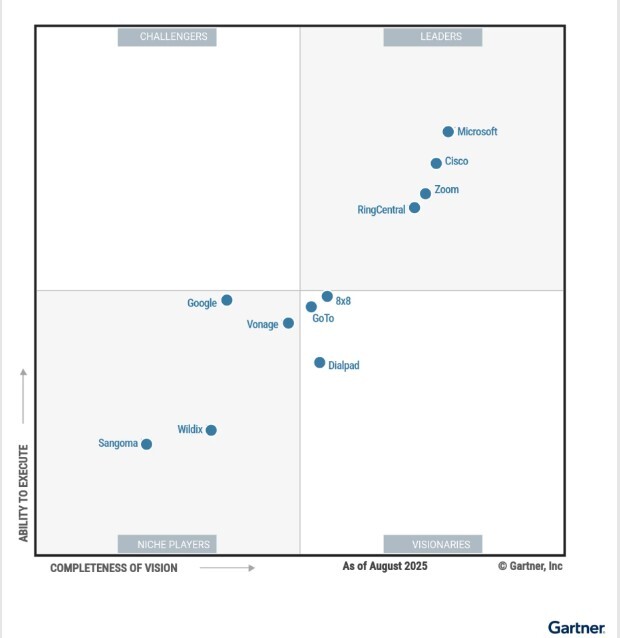
Gartner Magic Quadrant for UCaaS 2025
Zoom Phone Features
Zoom Phone provides business calling and centralized administration for organizations ranging from small businesses to large, distributed enterprises.
Available capabilities include:
- Business telephone numbers and extension dialing
- Zoom Workplace desktop and mobile applications
- Compatible desk phones and conference devices
- Voicemail and voicemail transcription
- Auto receptionists and interactive voice menus
- Call queues and shared-line groups
- Call transfer, forwarding, park and hold
- Business SMS and MMS
- Call recording and monitoring
- Online fax capabilities
- Call analytics and reporting
- Centralized user and device administration
- Microsoft Teams and business-application integrations
- Emergency-calling and location-management capabilities
Available features, calling areas, SMS capabilities, fax services, recording, retention and licensing requirements vary by plan and location. HCWT can review your organization’s requirements and recommend the appropriate Zoom Phone licensing and configuration.
Zoom Contact Center
Zoom Contact Center is an AI-powered cloud contact center that helps organizations manage customer interactions across voice, video, email, web chat, SMS and social-media channels. It provides a unified workspace for agents and supervisors while connecting customer communications, business applications, analytics and workforce tools.
Zoom Contact Center can support customer-service departments, help desks, utility billing teams, government service centers, school-district departments, healthcare scheduling, sales teams and other operations requiring more advanced routing and reporting than a standard business phone system.
Zoom Contact Center capabilities include:
- Omnichannel customer interactions
- Automatic call distribution
- Skills-based and intelligent routing
- Interactive voice response
- Customer self-service
- AI-assisted routing and agent support
- Real-time transcription
- Agent and supervisor workspaces
- Call and interaction recording
- Real-time dashboards and historical reporting
- Quality management
- Workforce engagement tools
- Customer surveys and voice-of-the-customer capabilities
- CRM and help-desk integrations
- APIs for customized integrations and workflows
- Zoom Virtual Agent and other Zoom CX options
Available channels, AI capabilities, recording, workforce tools and integrations depend on the Zoom Contact Center licenses and additional services selected.
Migrate a Legacy Phone System to Zoom Phone
HCWT helps organizations migrate from Mitel, ShoreTel, Avaya, Cisco, Nortel, NEC, Toshiba and other legacy phone systems to Zoom Phone and Zoom Contact Center.
Before migration, we document the functions that must be preserved or redesigned, including:
- Telephone numbers and extensions
- Auto attendants and call-routing schedules
- Hunt groups, workgroups and call queues
- Voicemail boxes and greetings
- Contact-center agents, supervisors and reports
- Paging and overhead-notification systems
- Fax machines and analog devices
- Elevator, emergency and door phones
- Call recording and retention
- Microsoft Teams and CRM integrations
- Emergency-calling locations
- Carrier circuits and SIP services
HCWT then creates a phased migration plan covering licensing, network preparation, number porting, device deployment, configuration, testing, user training and cutover support.
The existing telephone and contact-center systems should remain available until critical call paths, emergency services, integrations and specialty devices have been verified on the new platform.
Zoom Phone and Microsoft Teams
Organizations using Microsoft Teams can integrate Zoom Phone calling into their Microsoft environment. Depending on the selected configuration, employees can access Zoom Phone capabilities through Microsoft Teams, Zoom Workplace or a combination of the two.
A successful integration requires planning for Zoom and Microsoft licensing, telephone numbers, calling policies, emergency locations, extension dialing, call queues, auto attendants, common-area phones and ongoing administration.
HCWT can help your organization:
- Evaluate Zoom Phone and Microsoft Teams integration options
- Identify required Zoom and Microsoft licenses
- Configure users and telephone numbers
- Design call routing and extension dialing
- Address emergency-calling requirements
- Configure supported common-area devices
- Test inbound and outbound calls
- Train administrators and users
- Provide ongoing support
Zoom Phone for Government Agencies
Government agencies may need public-facing auto attendants, departmental call queues, emergency and after-hours routing, mobile communications for field personnel, call recording, reporting and detailed emergency-location information.
HCWT can help agencies design Zoom Phone and Zoom Contact Center around operational, administrative and public-service requirements. We can also coordinate implementation with existing networks, Microsoft environments, carrier services, paging systems and specialty devices.
Zoom Phone for School Districts
School districts must account for administrative offices, classrooms, transportation, maintenance, front desks, substitute staff, common-area phones, overhead paging, emergency notification and precise emergency-calling locations.
HCWT can help districts create a building-by-building deployment plan that addresses:
- Classroom and administrative phones
- Main numbers and school auto attendants
- Transportation and maintenance departments
- District and school call queues
- Emergency and after-hours routing
- Paging and notification integrations
- Common-area and emergency phones
- Network and internet redundancy
- Administrator and user training
- Phased implementation around school calendars
Zoom Phone for Public Utilities
Public utilities may depend on telephone service for customer service, billing, dispatch, field operations, control rooms and communications across critical facilities.
HCWT can help utilities evaluate requirements such as:
- Customer-service queues
- Zoom Contact Center routing and reporting
- Dispatch and field communications
- Remote facilities
- Emergency and after-hours calling
- Call recording and retention
- Paging and notification systems
- Analog and specialty devices
- Internet redundancy
- Local survivability and business continuity
The migration can be performed in phases to protect essential services and reduce operational risk.
Zoom Phone for Multi-Location Organizations
Zoom Phone allows organizations to centrally manage users, telephone numbers, devices and call routing across multiple locations. Employees can communicate from an office, another company location, home or a mobile device while maintaining their business identity.
HCWT can help consolidate separate telephone systems and carrier services into a coordinated environment. We also assess internet connectivity, network switching, Power over Ethernet, firewalls, voice quality, internet failover and business-continuity requirements at each location.
Compatible Zoom Phone Devices
Zoom Phone supports compatible desk phones, conference phones, headsets and other devices from leading manufacturers. Employees can also use Zoom Workplace applications on supported computers and mobile devices.
HCWT can review your current telephone inventory to determine whether any devices are appropriate for reuse. Compatibility should be verified by model, hardware revision, firmware, provisioning history and required features before reuse is included in a migration budget.
HCWT can also recommend, configure and deploy new devices based on each employee’s role and working environment.
Network Readiness and Business Continuity
Cloud calling depends on reliable local networks, internet connections and electrical power. Before deployment, HCWT can assess:
- Internet bandwidth and reliability
- Network latency, jitter and packet loss
- Firewall requirements
- Voice VLANs and quality of service
- Power over Ethernet capacity
- Wired and wireless coverage
- Internet and cellular failover
- Battery backup
- Alternate call routing
- Local survivability requirements
This assessment helps identify network weaknesses before they affect users or customers following the migration.
Emergency Calling
Emergency calling must be configured and tested for every organizational location. Mobile and remote employees, classrooms, common-area phones and employees who move between locations may require additional planning.
HCWT can help configure and verify:
- Emergency addresses and dispatchable locations
- Appropriate callback numbers
- On-site emergency notifications
- Emergency-calling policies
- Common-area and remote-user configurations
- Calling behavior during internet or power failures
- Documented emergency-call testing
Organizations remain responsible for maintaining accurate location information and complying with applicable emergency-calling requirements.
Why Work with High Country Workplace Technologies?
High Country Workplace Technologies is certified to sell Zoom Phone and Zoom Contact Center. HCWT combines current Zoom product knowledge with more than 40 years of experience in business telephone systems, contact centers, networks, carrier services and workplace technologies.
Our team understands both the new Zoom environment and the legacy communications system being replaced. This allows HCWT to coordinate the phone system, contact center, network, telephone numbers, devices, emergency calling, integrations, training and cutover as one complete project.
HCWT supports businesses, government agencies, school districts, public utilities, hospitality properties and multi-location organizations throughout Colorado and across the United States.
Contact High Country Workplace Technologies to learn whether Zoom Phone and Zoom Contact Center are the right communications solutions for your organization.
Zoom Phone and Zoom Contact Center Frequently Asked Questions
Is HCWT certified to sell Zoom Phone?
Yes. High Country Workplace Technologies is certified to sell Zoom Phone. HCWT can help organizations evaluate licensing, design the system, port telephone numbers, configure users and devices, provide training and support deployment.
Is HCWT certified to sell Zoom Contact Center?
Yes. HCWT is certified to sell Zoom Contact Center. We can help organizations define their contact-center requirements, design queues and customer journeys, configure agents and supervisors, integrate business applications and support the transition from a legacy contact center.
What is the difference between Zoom Phone and Zoom Contact Center?
Zoom Phone is a cloud business telephone system for organizational calling, voicemail, SMS, fax and call routing. Zoom Contact Center is designed for customer-service operations requiring advanced routing, multiple communication channels, agent and supervisor tools, reporting, quality management and AI-assisted customer experiences.
Can HCWT migrate our existing phone system to Zoom Phone?
Yes. HCWT can assess your existing system, document users and call flows, prepare the network, coordinate number porting, configure Zoom Phone, deploy devices, train users and support the cutover.
Can we keep our existing telephone numbers?
Existing business numbers can generally be transferred when they are portable and the current carrier records are accurate. HCWT can review the numbers, collect the required documentation and coordinate the porting process.
Can Zoom Phone work with Microsoft Teams?
Yes. Zoom offers integrations that allow organizations to use Zoom Phone capabilities with Microsoft Teams. Required licenses and available functionality depend on the selected configuration.
Do employees need desk phones?
No. Employees can use Zoom Workplace applications on compatible computers and mobile devices. Desk phones may still be appropriate for receptionists, executives, classrooms, common areas, conference rooms and employees who prefer a traditional telephone.
Can existing desk phones be reused?
Some existing IP phones may be compatible, but reuse should not be assumed based only on the model number. HCWT can verify hardware, firmware, provisioning and feature requirements before determining whether a phone should be retained.
Does Zoom Phone support emergency calling?
Zoom Phone provides emergency-calling and location-management capabilities. Proper configuration and testing are essential, particularly for multi-building organizations, remote employees, classrooms and common-area phones.
Does HCWT provide support after deployment?
Yes. HCWT can provide ongoing Zoom Phone and Zoom Contact Center administration, troubleshooting, user changes, call-flow modifications, carrier assistance, network support and system optimization.
Choosing a cloud communications system should begin with a review of your organization’s users, agents, locations, telephone numbers, devices, network, call flows, integrations and business-continuity requirements.
Contact High Country Workplace Technologies to determine whether Zoom Phone and Zoom Contact Center are the right communications solutions for your organization and to begin planning your deployment or migration.