
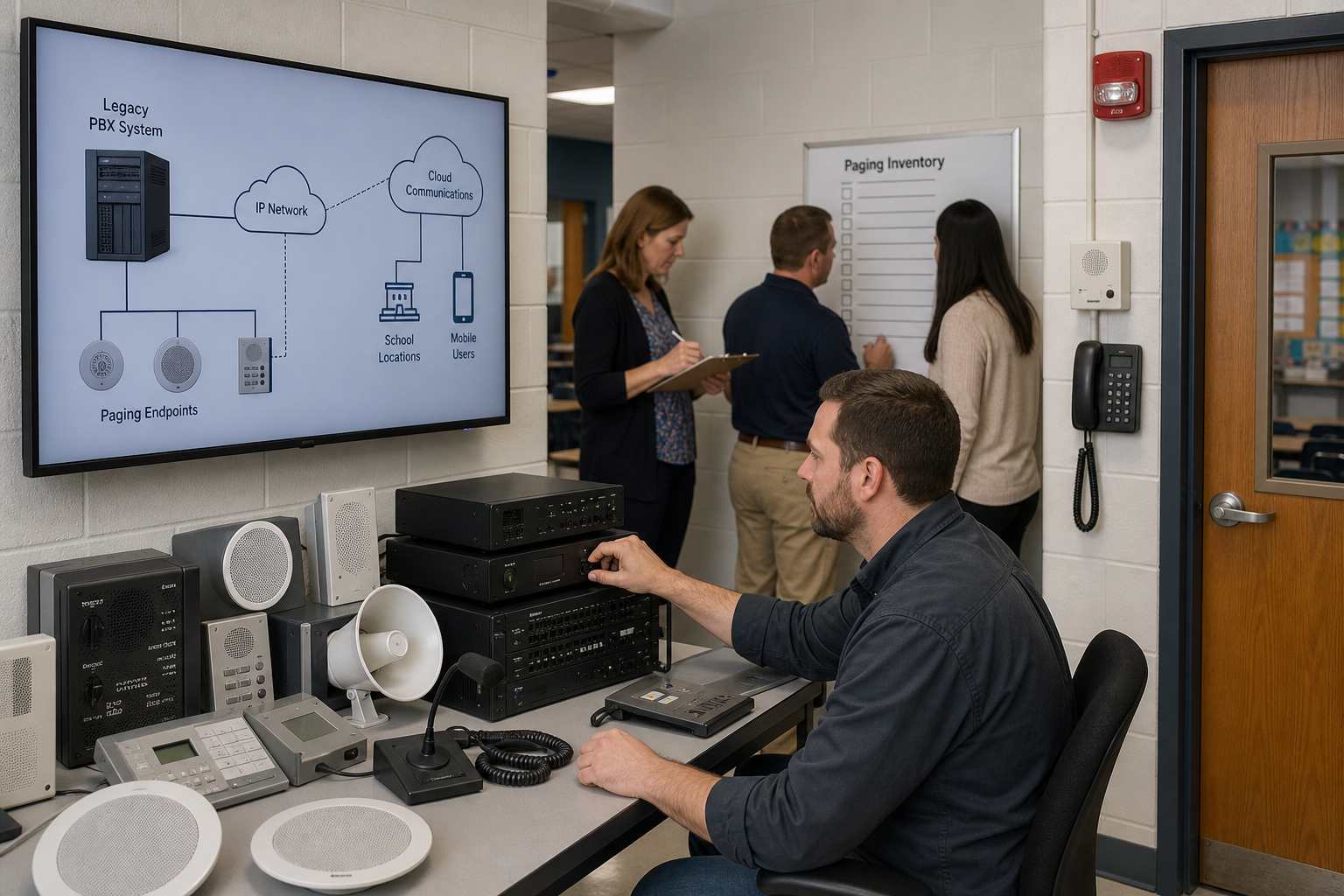
 Moving a school district from a legacy PBX to cloud communications involves much more than replacing desk phones.
For many districts, paging and intercom are among the most complicated parts of the migration.
A legacy Mitel, ShoreTel, Avaya, Cisco, Nortel or NEC phone system may have been connected to the school's paging infrastructure for decades. Over that time, different schools may have accumulated different amplifiers, speakers, paging adapters, classroom intercoms, door stations, bells and emergency-notification equipment.
HCWT's school-district migration guidance already identifies paging, bells, intercoms and door phones as systems that should be tested before a legacy PBX is disconnected. HCWT
The good news is that moving the telephone system to the cloud does not necessarily mean replacing the entire paging system.
The first step is understanding exactly what is installed today.
Why School Paging Is Different From Ordinary Business Paging
In a typical office, paging might consist of a few overhead speakers connected to an amplifier.
A school can be considerably more complicated.
One district may have:
- Analog Bogen or Valcom paging systems
- SIP paging adapters
- IP speakers
- Classroom speakers
- Two-way classroom intercom
- Multiple paging zones
- Scheduled bells
- Gymnasium and outdoor speakers
- Door-entry intercoms
- Emergency or all-call paging
- Fire-alarm-initiated announcements
- Different paging equipment at different schools
HCWT's school-district RFP guidance specifically recommends treating paging and intercom as a major part of the procurement rather than simply requiring that a new system "support paging." HCWT
The objective of the migration should therefore not be:
Replace the paging system.
It should be:
Determine how every existing paging and intercom function will operate after the legacy PBX is removed.
1. Start With a Building-by-Building Paging Inventory
Before selecting an interface or ordering equipment, document the paging environment at every school and facility.
For each location, determine:
What paging equipment is installed?
Record the manufacturer and model of the paging controller, amplifier, interface and other major components.
How does the PBX connect to it?
The connection might be:
- Analog station port
- Analog trunk port
- SIP endpoint
- SIP trunk
- Paging adapter
- Audio interface
- Relay/contact closure
- Network connection
- Multicast IP
What does the system actually do?
Don't document only "paging."
Determine whether it provides:
- All-call
- Individual zones
- Classroom paging
- Two-way intercom
- Scheduled bells
- Emergency announcements
- Door intercom
- Door release
- Outdoor paging
- Athletic-field paging
This inventory becomes the basis for the cloud migration design.
2. Understand FXS vs. FXO Before Replacing the PBX
One of the most common sources of confusion in legacy paging migrations is the difference between FXS and FXO.
They are not interchangeable.
FXS
An FXS interface provides analog telephone service—including dial tone, battery and ringing voltage—to an analog device.
Think of it as behaving like the analog station port on the old PBX.
If the existing paging interface expects the PBX to provide an analog station connection, the replacement solution may require an FXS port from an ATA or gateway.
FXO
An FXO interface receives analog telephone service from another device.
Some paging controllers provide the equivalent of an analog telephone line and expect the PBX or paging interface to connect to it as an FXO device.
That requires a different interface.
This distinction matters because simply ordering an "analog adapter" doesn't tell you whether it will work with the existing paging equipment.
Bogen, for example, documents paging/intercom access from a PBX using FXO or FXS ports, as well as SIP ATA or tie-line connectivity for IP phone systems. Bogen
Before ordering anything, determine:
Which device is providing the analog line and which device is receiving it?
3. Can an Existing Bogen or Valcom Paging System Stay?
Often, yes.
Moving the telephone system to the cloud does not automatically require replacing functioning amplifiers, speakers and cabling.
If an existing Bogen, Valcom or other paging system is working properly, the migration design may simply need to replace the connection that previously came from the PBX.
Depending on the equipment, that could involve:
Cloud communications → SIP paging interface → existing paging system
or:
Cloud communications → ATA/gateway → analog paging interface → existing amplifier
The exact design depends on the paging equipment.
This is why HCWT recommends identifying whether an existing system expects an analog station, analog trunk, SIP connection or another interface before selecting the migration method. HCWT
4. SIP Paging Can Eliminate Some Analog Interfaces
Some newer paging systems can communicate directly using SIP.
A SIP paging adapter or SIP-enabled paging controller can register to a compatible communications platform much like another endpoint.
That can allow a user to dial an extension such as:
7000 — District Office Page
7001 — Elementary School All Call
7002 — Elementary School Office
7003 — Elementary School Classrooms
The paging controller then determines where the audio is sent.
In other environments, individual SIP speakers or endpoints may be registered separately.
The important question isn't simply:
Does the cloud phone system support SIP?
It is:
How will this specific paging system communicate with this specific cloud platform?
5. Don't Assume Multicast Works Between Schools
IP paging introduces another important consideration: multicast.
Some IP paging systems distribute audio using multicast traffic.
That can work very well inside a building or VLAN designed for it.
But school districts frequently have multiple buildings connected by a WAN, and multicast may not traverse that network in the same way as normal unicast IP traffic.
HCWT's current school RFP guidance specifically identifies environments where paging must operate across buildings even though multicast is unavailable between sites. HCWT
So during discovery, ask:
Does the existing paging system use multicast?
Then:
Where does multicast actually work?
Do not assume that because paging works inside one school it will automatically work across the district WAN after the phone-system migration.
6. Two-Way Classroom Intercom Requires Special Attention
Paging and classroom intercom are not necessarily the same thing.
A one-way page may simply send audio from the office to classroom speakers.
A two-way classroom intercom may allow the front office to call a classroom speaker or station and allow someone in the classroom to respond.
That capability can involve:
- Classroom speakers
- Call buttons
- Microphones
- Intercom controllers
- SIP endpoints
- PBX extensions
- Dedicated intercom platforms
Replacing the PBX without understanding this relationship can eliminate functionality that school staff depend on every day.
The migration plan should explicitly identify whether each classroom requires:
One-way paging, two-way intercom, telephone calling—or all three.
7. Don't Forget School Bells
School bells may be completely independent of the telephone system.
Or they may not be.
Some paging and intercom platforms provide scheduled tones or announcements for:
- Class changes
- Lunch periods
- Beginning and end of school
- Early-release schedules
- Special schedules
- Emergency notifications
If the legacy PBX, paging controller or another server participates in bell scheduling, that dependency needs to be identified before equipment is removed.
A successful cloud migration should not result in someone discovering on the first day of school that the phones work but the bells don't.
8. Door Phones and Vestibule Intercoms Are Part of the Communications Environment
Door stations are another frequently overlooked dependency.
A visitor may press a button at a school entrance that calls:
- The receptionist
- Front office
- Security
- A hunt group
- Multiple phones simultaneously
An employee may then speak with the visitor and activate a relay to unlock the door.
The existing PBX may be an important part of that process.
During migration, determine:
- Is the door station analog or SIP?
- What extension does it call?
- Can it call multiple destinations?
- How is the door-release relay activated?
- Does it use DTMF?
- Does the system integrate with access control?
- What happens if the network or cloud service is unavailable?
Do not assume that because a door station is SIP-based it will automatically work with every cloud communications platform.
9. Emergency and All-Call Paging Need Separate Testing
Normal paging and emergency paging should not automatically be treated as the same requirement.
A school may have separate procedures for:
- Normal announcements
- School-wide all-call
- Lockdown
- Evacuation
- Severe weather
- Fire
- Other emergency notifications
Some environments may also integrate the paging/intercom platform with fire-alarm or emergency-notification systems.
Those functions should be documented separately and tested according to the district's procedures and applicable requirements.
A telephone-system migration should never unintentionally change a life-safety workflow simply because the new cloud platform handles paging differently.
10. Determine Who Owns Each Part of the Solution
Paging migrations can become difficult when several vendors are involved.
The cloud provider may say:
"We provide the SIP connection."
The paging vendor may say:
"Our equipment works if you provide the correct interface."
The network provider may say:
"The network is working."
And the school district can end up between three vendors trying to determine why the page doesn't work.
Before implementation, establish responsibility for:
Cloud configuration → gateway/interface → network → paging controller → amplifier → speakers
Someone should own the end-to-end test.
For school districts, that is an important consideration when choosing both the cloud platform and the implementation partner.
11. Build a Paging Proof of Concept
Do not wait until the district-wide cutover to discover whether an existing paging amplifier works with the proposed cloud solution.
Build a representative proof of concept.
Select a school with the types of equipment the district needs to support and test the proposed design with the actual paging equipment.
Test:
- All-call
- Individual zones
- Classroom paging
- Two-way intercom
- Bell schedules
- Door phones
- Door release
- Emergency paging
- After-hours operation
- Network failover where applicable
HCWT's cloud-platform selection guidance similarly recommends proving critical paging and analog integrations with the actual amplifier, controller or endpoint rather than relying solely on a laboratory assumption. HCWT
12. Test Paging Before Porting Telephone Numbers
HCWT recommends building and testing as much of the new cloud communications environment as possible before production telephone numbers are ported.
Paging should be part of that testing.
The new system should already be able to demonstrate:
Cloud phone → paging access number → paging interface → amplifier/controller → correct speakers
before the legacy PBX disappears.
HCWT uses the same approach for the broader migration: configure and test phones, call routing, E911, paging, door stations and analog devices before the final production number port whenever possible. HCWT
13. Consider a Phased Paging Migration
A district does not necessarily have to replace every paging environment at once.
For example:
School A: Existing analog Bogen system remains with a new interface.
School B: Existing Valcom system receives a SIP paging adapter.
School C: Existing IP paging platform integrates directly with the new communications environment.
School D: Aging paging equipment is replaced as part of the project.
That can be much more practical than forcing every school into the same technical design.
The appropriate solution should be based on the equipment and requirements at each location.
Should a School District Replace Its Paging System During a Cloud Migration?
Not automatically.
If the existing speakers, amplifiers and controllers are functioning properly and can be integrated reliably with the new communications platform, keeping them may reduce project cost and disruption.
However, a cloud migration can also be a good opportunity to replace paging equipment that is:
- Obsolete
- Unreliable
- Poorly documented
- Difficult to support
- Unable to meet current requirements
- Incompatible with the new communications architecture
The decision should be based on the condition and capabilities of the paging system—not simply on the age of the PBX.
The Most Important Question to Ask
When evaluating a cloud phone system, don't ask only:
"Does your platform support paging?"
Ask:
"Show us exactly how our existing paging, intercom, bells and door systems will operate after our legacy PBX is disconnected."
That is a much more meaningful requirement.
HCWT Can Help With School Paging and Intercom Migration
High Country Workplace Technologies works with both legacy PBX environments and modern cloud communications platforms.
That matters during a school migration because someone needs to understand not only the new cloud service, but also how the old PBX connects to the systems the district intends to keep.
HCWT can help school districts inventory and evaluate:
- Existing Mitel, ShoreTel, Avaya and other PBX environments
- Bogen and Valcom paging
- Analog FXS and FXO interfaces
- SIP paging
- Paging adapters and gateways
- Classroom phones
- Two-way intercom
- Door phones
- Analog devices
- E911
- Network requirements
- Phased PBX-to-cloud migration
HCWT's broader school modernization approach similarly begins by inventorying paging, bell systems, emergency endpoints, door entry, analog equipment and network dependencies before establishing the migration design. HCWT
The objective is not simply to make the new phones work.
The objective is to make sure the school's entire communications environment continues to work after the old PBX is gone.
Frequently Asked Questions
Can an existing school paging system work with a cloud phone system?
Often, yes. Existing paging equipment may be integrated through SIP, an analog adapter or gateway, a paging interface or another supported connection. The correct solution depends on how the existing paging controller or amplifier interfaces with the current PBX.
What is the difference between FXS and FXO for school paging?
FXS provides an analog telephone interface such as dial tone, battery and ringing voltage. FXO receives that analog telephone interface. Existing paging equipment may require one or the other, so the electrical orientation should be identified before selecting an ATA or gateway.
Can a school keep its existing Bogen or Valcom paging system?
Often, yes. If the existing paging system remains functional and a compatible interface can be provided, the speakers, amplifiers and other infrastructure may not need to be replaced simply because the PBX is moving to the cloud.
Can SIP be used for school paging?
Yes, depending on the cloud communications platform and paging equipment. SIP paging adapters, controllers and endpoints can provide an IP-based connection between the communications platform and the paging system.
Will multicast paging work between school buildings?
Not necessarily. Multicast may be limited by VLAN, routing and WAN design. Districts should determine where multicast is currently supported and whether the proposed paging design depends on multicast traffic crossing between locations.
What happens to classroom intercom when the PBX moves to the cloud?
It depends on the existing system. Two-way classroom intercom may involve separate controllers, speakers, microphones, call buttons or SIP endpoints. These should be documented and tested separately from ordinary telephone calling and one-way paging.
Can door phones be migrated to a cloud phone system?
Often, but the door station's signaling and door-release requirements need to be evaluated. An analog or SIP door phone may require specific registration, DTMF, relay or access-control integration.
Should paging be tested before the school district ports its telephone numbers?
Yes. Paging, intercom, bells, door phones, analog devices and emergency communications should be tested before the legacy PBX is disconnected whenever possible.
Please Contact Us if you would like to know more about how HCWT can assist with your migraiton
This article was authored by Jim Whitfield